Tag Templates Smudged-Edges Overlay
Sometimes I just want things to be easy. In the creative world, we often get caught up in the pursuit of perfection, spending hours tweaking digital brushes or manually distressing edges to achieve that authentic, handmade look. While there is a place for deep, time-intensive craftsmanship, there are also moments when efficiency wins. That is exactly why I created the Tag Templates Smudged-Edges Overlay. It was born out of a personal need for a fast way to make tags that seamlessly match other kit elements without the mess. If you have ever found yourself with inky fingers from trying to replicate a vintage aesthetic by hand, this solution might just change your workflow.
The Art of the Imperfect Edge
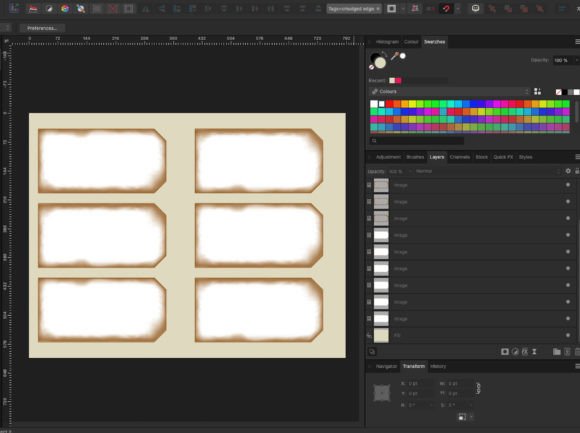
The visual personality of these templates lies in their intentional imperfection. The smudged edges mimic the natural wear and tear of physical materials, evoking a sense of nostalgia and tactile realism that clean vector shapes often lack. When you apply the overlay, it instantly transforms a flat digital image into something that feels tangible and grounded. This style fits perfectly within the realm of modern typography and design assets that prioritize character over clinical precision.
Whether you are working on packaging design, editorial layouts, or social media graphics, the distressed texture adds a layer of depth that suggests history and authenticity. It bridges the gap between the pristine nature of digital files and the rugged charm of analog crafts. The overlay isn't just a border; it is a mood setter. It tells the viewer that this project has been handled, touched, and curated with care, even if it was assembled entirely on a screen.
A Fast Solution for Complex Looks
Creating high-quality, distressed tags usually involves complex masking techniques or the use of specific digital brushes. Sure, you could mess about with digital brushes for each tag you make. You can spend an afternoon loading brush sets, adjusting opacity, and manually painting edges to get the right amount of grunge. But if you don't want to do that, or perhaps you don't know how to master those tools yet, this is a fast solution designed to save you time.
The process is straightforward. Open the high-resolution PDF in your preferred editing software—I used Affinity Photo, but most robust graphic editors will work. Use the provided tag images to mask any image, whether it's a PNG or JPG. Once the tag image is filled with your content, simply slide one of the smudged edges over the top. Export it, and your smudged-edge tag is done. No messy fingers, no complicated layer masks, just a polished result ready for your next project.
Integrating Assets into Your Brand Identity
Consistency is the backbone of strong brand identity. When you are building a suite of design assets, having elements that share a cohesive visual language is crucial. These templates allow you to quickly generate tags that match the vibe of your existing kit elements. Whether you are designing a logo design concept, creating web design banners, or putting together a collection of marketing materials, maintaining that "smudged" aesthetic across all touchpoints reinforces recognition.
This approach influences readability and visual hierarchy by drawing the eye to the content within the frame while the textured edge provides context. It signals to the audience that the brand values a certain aesthetic—perhaps rustic, vintage, or artisanal. By using a tool like the Tag Templates Smudged-Edges Overlay, you ensure that every piece of communication, from a small business owner's product label to a publisher's promotional flyer, feels part of the same family.
Customization and Flexibility
One of the most powerful features of this system is its adaptability. You are not locked into a single color scheme. It is worth noting that you can change the distressed edges with a click to any colour you like. This allows the asset to blend seamlessly with various color palettes, ensuring it complements rather than clashes with your primary brand colors. Furthermore, you can apply a blend mode to alter them further, integrating the texture more subtly or making it pop depending on the background.
Scalability is another key factor. You can resize the tags as long as you resize the overlay to match. This flexibility means you aren't limited to one size format. Whether you need a tiny favicon-style element or a large hero image for a website, the proportions remain consistent. Just remember to scroll through the photos in the documentation to see exactly how I do it, ensuring you maintain the integrity of the design at different scales.
Practical Applications Across Industries
The utility of these templates extends far beyond simple craft projects. For entrepreneurs and marketers, speed is often currency. Being able to produce professional-looking assets quickly allows you to iterate faster and respond to trends. Here is where these templates shine:
- Packaging Design: Create instant labels for small-batch products that need a handcrafted feel without the cost of custom die-cutting.
- Editorial Design: Use the tags as chapter markers or pull-quote containers in digital magazines and ebooks.
- Social Media Graphics: Generate eye-catching overlays for Instagram stories or Pinterest pins that stand out in a crowded feed.
- Web Design: Incorporate them as unique buttons or section dividers that add texture to a flat interface.
While the templates are primarily digital assets intended for screen-based work or high-quality print exports, they serve as a versatile foundation. They act as a display font alternative in terms of function—providing structure and style without requiring you to type text in a specific script font or handwritten font. Instead, they frame your text, allowing you to choose the perfect sans serif font or serif font for the interior content.
Licensing and Professional Use
When selecting design assets for commercial projects, understanding the scope of what you are buying is essential. This package includes one high-resolution PDF to open in editing software. It is important to note that this file is not really suitable for printing directly as a physical sheet of paper. Its purpose is to be imported into your workflow to create final graphics. However, once you have exported your finished tags, those resulting images are ready for both digital distribution and professional printing.
For those looking for a premium font or a comprehensive typeface library, this is a complementary tool. It works best alongside your existing typography choices. If you are evaluating project fit, consider whether your brand voice aligns with the organic, slightly imperfect nature of the smudged edge. If your brand is ultra-minimalist and sterile, this might clash. But for brands that embrace warmth, humanity, and creativity, it is an excellent addition to your toolkit.
Final Thoughts on Efficiency and Creativity
Design is often a balance between art and logistics. We want our work to look incredible, but we also have deadlines and budgets to manage. The Tag Templates Smudged-Edges Overlay represents a smart compromise. It offers the high-end look of a custom-made asset with the ease of a template. By removing the technical friction of creating distressed edges from scratch, it frees you up to focus on the bigger picture: your message, your layout, and your overall strategy.
I hope you find this useful for your own digital work. Whether you are a seasoned designer looking to streamline your process or a hobbyist wanting to elevate your projects, having a reliable shortcut can make a significant difference. Do the full set and export a sheet to print your designs, or keep them digital for your online presence. The goal is to make your creative journey smoother, so you can spend less time wrestling with tools and more time bringing your ideas to life.